How to Use Stage Whisper for NSFW Roleplay
Stage Whisper is built for long-running TTRPG campaigns. For a player to create a character, an expansive world, and for the system to keep track of all the NPCs, lore, locations, for them to explore over time.
A lot of current NSFW AI chat platforms focus only on a user chatting with a single AI character. They may get into different scenarios, but most platforms have a limited context and memory, resulting in the AI forgetting what had happened in the past. Certainly very few have support for managing long-term plotlines and multiple characters.
Where Stage Whisper and NSFW RP or ERP intersect, is that it is possible to get Stage Whisper to do NSFW content, but it will fit into the structure of a long-running RPG campaign, where someone would still play their campaign, explore the world, do quests and missions that are part of that, but have the opportunity to have more intimate moments with the characters with fewer boundaries on content than exist currently.
This makes those intimate moments feel earned, because the platform doesn't push that on you. While you could potentially structure the campaign to put you in those situations immediately, the default would be you end up playing a campaign, and when the moment fits, it fits. Ultimately just like the rest of the campaign, it is up to you to engage in the type of content you want to engage in and in the way you want to. The AI is there to assist and will not push a specific style on you.
How NSFW Content Works on Stage Whisper
Stage Whisper does not provide access to uncensored AI models directly, and has guiderails preventing explicit content from being used. This is due to the terms and conditions of our AI provider.
However, Stage Whisper has BYOK support, where it can use your own API keys. When using BYOK, this disables any content guiderails and does not deduct from the credits in your account. You become solely responsible for the content and cost when you use Stage Whisper in this way. If you use a model provider that allows NSFW content, such as Venice.ai, then you can engage in the content that they allow you to. Stage Whisper will not get in the way of that, other than the standard set of roleplay and TTRPG rules that it loosely enforces.
However, to protect our own AI service agreement, we do have to track whether NSFW content is happening in a particular session. If you turn off BYOK, we may have to prevent resuming the session with our own AI provider, as that can violate our AI provider agreements. So we tag turns and sessions as NSFW purely for that purpose.
You can roll back your session to a point before NSFW content was added, to resume using our AI provider. Or you can continue to the end of the session with your BYOK key, after which point a sanitized session recap is generated, and you can continue using our keys next session.
Setting Up BYOK
Guide with screenshots to be added here.
-
Get an API key with a provider. You first need to get an API key from a supported provider. For example Venice.ai. Please check the documentation/help for the specific provider for how to do that.
-
Select an appropriate AI model to use. When usign BYOK, you get to choose which AI model gets used. How well Stage Whisper works will vary greatly with model, you may find some models do not work at all, others are expensive to run. I recommend a model with >100k context.
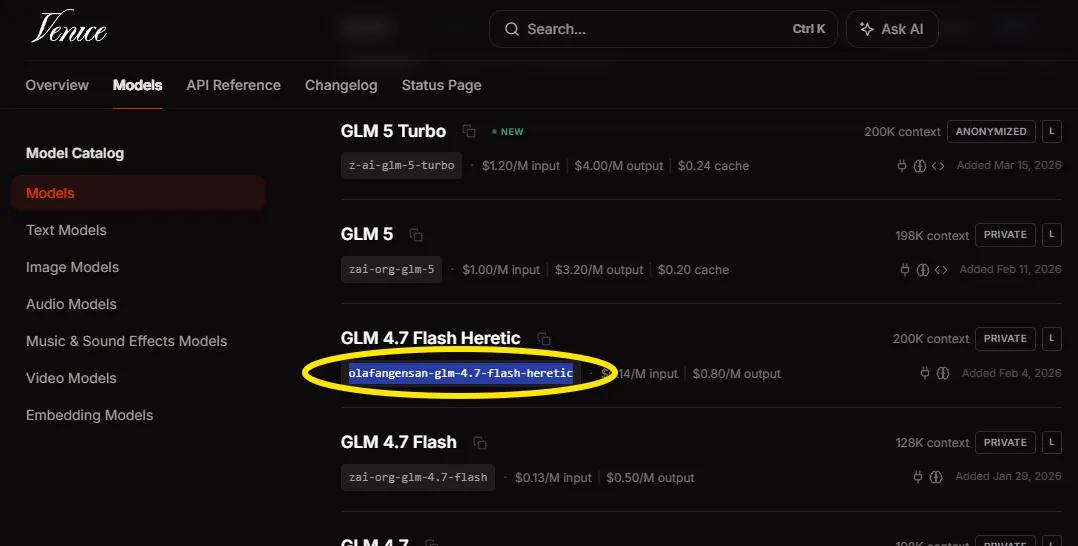
- Go to your credits page to add a new BYOK provider. Select the provider from the dropdown, paste in your API key, and enter the model name.
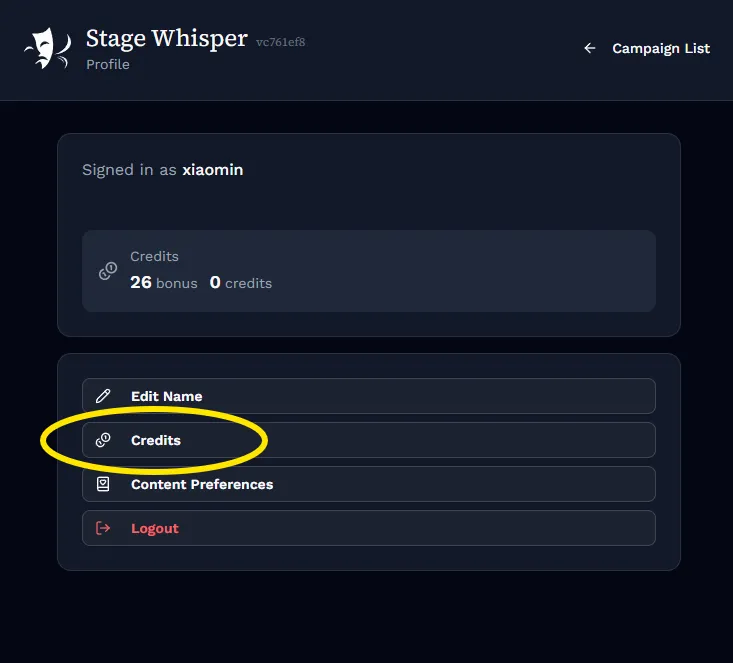
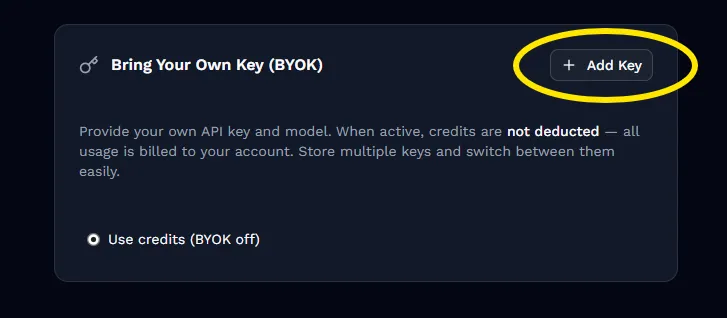
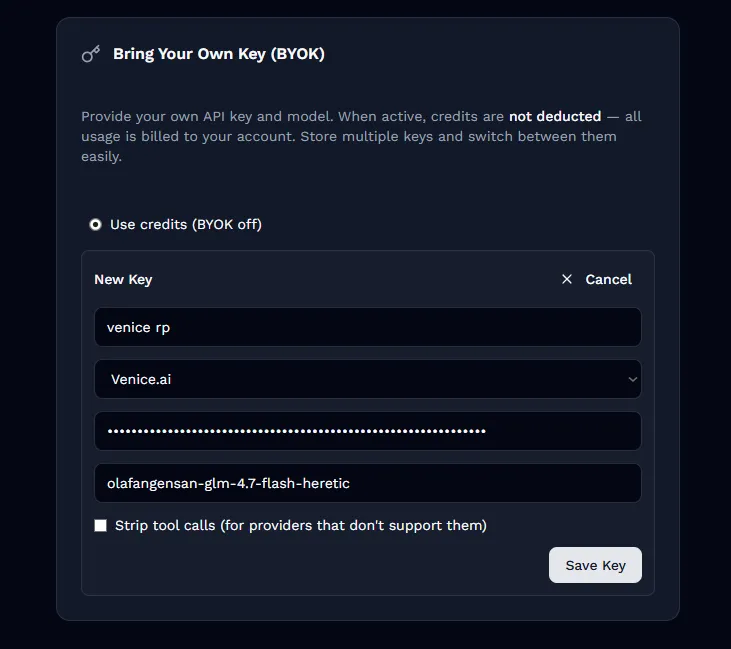
- During play, you can now select this BYOK option. All AI calls will no go to your selected provider using your API key, and we internally disable guadrails.

Optimizing costs
BYOK can occasionally get expensive, especially if you rely on the biggest and best models for the best experience. To help with that, Stage Whisper breaks down its AI usage into multiple different stages, allowing you to pick cheaper models to use for simpler tasks. You can map individual BYOK keys that have different model selections to each of the roles for fine-grain control over which model is used when. The roles are:
- Game Director: This AI is used to apply the TTRPG rules. This is only used if you selecte any system that isn't "Roleplay", such as the lightweight "Stage Whisper" ruleset. For best performance a light varient of a relatively modern model is good. For example: GLM 4.7 Flash
- Story Director: This AI is what drives the plot. This is the one with the largest context needs and the most complex job. Picking too weak a model here will result in a very "flat" and unimaginative plotline. It'll feel procedural and a little boring. For best results, this should be a good model with 200k context. Any recent model since December 2025 will work well for this: Kimi k2.5 and newer. Minimax M2.7 and newer, Qwen 3.5 and newer (large variants only), Xiaomi MiMo v2 and newer, GLM 4.7 and newer, Deepseek 4 and newer, and so on.
- Scene Director: This AI is what wirtes the dialog. It can be a weaker model than the Story Director. It doesn't have to make plot decisions, but still needs to write well. A mid-range model is suitable for this. For example GLM 4.6, Minimax M2.5, Deepseek 3.2, Qwen 3.5 112B.
- Summarizer: This AI generates scene summaries and NPC memories, it can be a light-weight model, similar to the Game Director
- Planner: This AI runs between sessions to update NPC sheets, locations, campaign files, and plan the next session. This can be a mid-range to heavy model
- Setup Agent: This AI is only used during campaign setup. It can be a mid-range model.
An example of a possible setup, using Venice.AI decensored/permissive models for NSFW campaigns:
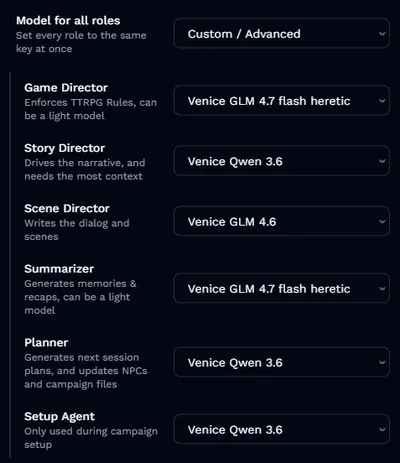
In this setup, the lightweight GLM 4.7 flash heretic is used for the game director and sumarizer, which don't need so much horsepower. While GLM 4.6 is used for the scene director, which is primarily responsible for writing the dialog. Then the relatively heavy Qwen 3.6 Plus deals with the more intricate parts of maintaining the plotline.
Getting Started
To use NSFW content on Stage Whisper, you need to bring your own API key from a provider that allows it. Set up BYOK in your account settings, choose a compatible model, and your sessions will run without content restrictions.
From there, it is just playing a Stage Whisper campaign as normal. The same memory system, the same session structure, the same thread tracking. Just with more freedom in the moments that matter to you.
Stage Whisper is built for people who want agency in their roleplay, on their own terms. Get started or join our Discord.